



Video editing used to eat 6+ hours of my day for a single 10-minute video. AI cut that to 100 minutes when it works. When it doesn’t? I once spent 3 hours fixing an AI mistake that deleted my client’s punchline. That’s the AI video editing reality in 2025: massive time savings with occasional catastrophic failures you need to know about.
These tools cost around $800 yearly and demand serious computing power, but they’ve completely changed how I work. Here’s what actually works and what fails spectacularly.
Key Takeaways
- My editing time dropped from 6 hours to 100 minutes per video
- AI nails technical work but fails at comedic timing and pacing
- You’ll spend $500-800/year minimum for professional AI tools
- Descript beats Premiere for transcription (95% vs 80% accuracy)
- 16GB RAM mandatory, 32GB recommended, plus RTX 3060 or M1 chip minimum
Why Are Video Editors Using AI Now?
Survival. My competition started pumping out 5 videos a week while I was stuck at 2. When Adobe found 73% of marketers already using AI by 2023, that wasn’t hype. That was adapt or lose clients.
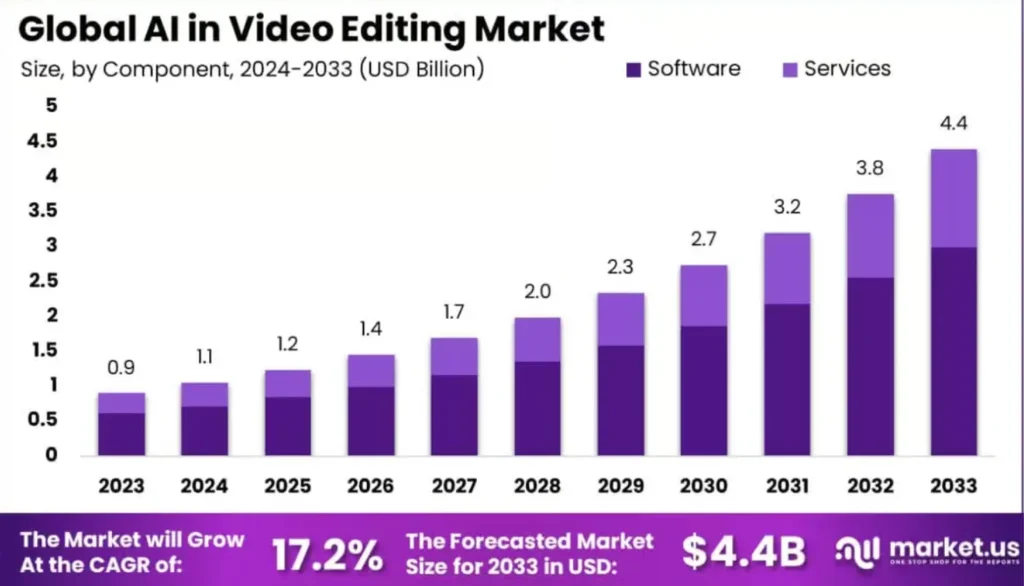
My proxy workflow with AI tools cut render times from 45 minutes down to 12 for a typical YouTube video. What used to take me 6 solid hours now wraps up in about 2 hours with Descript doing transcription and rough cuts.
Machine learning tools have advanced rapidly in the past year, making these capabilities accessible to everyday creators. Some bigger studios hire devs through machine learning development services to build custom systems, but that’s overkill. Off-the-shelf tools work fine.
AI Tools That Speed Up Editing
Automated Editing: Tools like Adobe Premiere Pro’s Auto Reframe, Magisto, and Pictory use neural networks to scan footage and assemble finished videos. I tested Auto Reframe on 20 Reels from Instagram using an instagram reels downloader to collect sample clips for analysis.
Smart Transcription: I tested Descript against Premiere’s built-in transcription. Descript won by a mile for accuracy (95% vs 80%), but Premiere’s faster for quick exports. Text-based editing changed my workflow more than any other AI feature. Being able to edit video like a Word doc feels natural.
Quality Enhancement: AI upscales 1080p to 4K, removes noise, and stabilizes shaky footage. Platforms like Depositphotos show how good stabilization has become. I use Topaz Video AI (version 4.1) for frame interpolation. It creates ghosting on fast hand movements and artifacts at 60fps exports, but for B-roll it’s perfect. This helps especially if you’re building a home recording studio where video supports audio work.
System Requirements: You need at least 16GB RAM and a decent GPU (RTX 3060 or M1 chip minimum). Budget an extra 500GB-1TB storage because AI upscaling balloons file sizes.
Creative AI Features
Visual Effects: Removing backgrounds and removing objects takes just clicks now. Runway ML strips backgrounds using neural networks without green screens. When it works, it’s magic. When it doesn’t? It cuts off parts of your subject or leaves weird halos.
AI Color Grading: DaVinci Resolve nails the LUTs and general color balance, but misses skin tones about 30% of the time. Always check skin tones manually after AI grading. Your subject looking orange is worse than no grading at all.
Text to Video: AI can create unique videos based on text (Text-to-Video). Modern AI video maker platforms produce quality videos without manual editing. They create realistic 3D models for promotional content. These platforms often leverage powerful AI APIs to handle complex model integration, enabling developers to plug into advanced generative tools without building everything from scratch.
I tested Runway Gen-2 for creating ambient clips similar to lo-fi music videos. Great for abstract stuff, but still struggles with human hands as of October 2024. For creators looking to pair music with dynamic visualizers, the VideoBolt Music Visualizer offers an AI-powered solution to generate visuals synced to your audio ideal for YouTube channels or beat makers.
Audio Processing: Sound quality keeps viewers watching, especially with best music production apps that have AI built in. I once recorded a podcast in a coffee shop because my mic died. Adobe Podcast Enhance cleaned up the background chatter perfectly. Text to music AI creates usable soundtracks for rough cuts.
My Current AI Workflow
Here’s my actual workflow for a 10-minute YouTube video:
- Import and Transcribe (20 mins): Descript auto-transcribes and removes filler words
- Story Edit (45 mins): I manually rearrange clips for pacing and emotion
- AI Color Grade (5 mins): DaVinci Resolve matches colors automatically
- Manual Color Tweaks (15 mins): I fix skin tones and add creative grading
- Upscale B-roll (10 mins): Topaz upscales only 3-4 clips that need it
- AI Noise Removal (5 mins): Adobe Podcast cleans dialogue audio
Total: 100 minutes vs 6+ hours before AI. The 70% time savings is real because I use AI for boring technical work and keep creative control over what matters.
If you want to understand how to make a video with pictures, AI applications will offer ready-made layouts. They will help you correctly arrange elements on the timeline, select suitable music and set up transitions.
When AI Actually WASTES Time: Real talk, AI sometimes costs time instead of saving it. I once spent 2 hours fixing Topaz artifacts that looked like oil paintings. Another time, Descript’s auto-cut deleted 20 minutes of usable content I had to restore manually. Factor in 15-20% “AI cleanup time” for your first few months until you learn each tool’s quirks.
Tool Recommendations By Use Case
Podcasters: Descript (text-based editing is unbeatable for dialogue)
Social media creators: CapCut (free, fast, mobile-friendly)
YouTube long-form: Premiere Pro + Topaz combo
Corporate/Client work: DaVinci Resolve (privacy and control)
Beginners on budget: CapCut or Filmora
Where AI Falls Short
Creative Vision Can’t Be Automated: I let AI auto-edit a product demo once. Technically fine, but zero personality. No comedic timing, no tension, no emotional arc. Just footage in order.
When to AVOID AI completely: Wedding videos, documentary work, narrative films, and client work with strict brand guidelines all require human judgment AI doesn’t have.
Template Similarity: I scrolled TikTok and saw 5 videos in a row with the exact same AI transition style. If your project needs visual identity, this creates problems.
Real Costs: Adobe Premiere Pro costs $30-50 monthly. I’m paying for Topaz ($199/year), Descript ($24/month), and Premiere ($54.99/month). That’s over $800 a year. Free alternatives max out at 720p exports.
Privacy Concerns: Cloud processing puts footage at risk. I edited a corporate training video with unreleased product info. Their legal team freaked out about cloud uploads. Confidential content needs local processing.
Can AI Replace Editors and What’s Coming Next?
No. Technical tasks work well with AI, but machines lack style sense and emotion interpretation. Social media clips work well automated, but cinematography needs detailed development machines can’t provide. Your job is safe, but it’s changing.
Will AI eventually handle creative editing? Maybe. But I’ve been hearing “AI will replace editors” since 2019. Every year it gets better at technical stuff and stays equally bad at story sense. My prediction? In 3 years, AI will cut my 100-minute workflow to 60 minutes. But the creative 30 minutes? Still mine. The fundamentals of pacing, emotion, and timing require human intuition that current AI architectures can’t replicate.
How This Changes Your Career
After 18 months testing this stuff daily, here’s my actual take: AI turned me from a button-pusher into a director. I spend way less time clicking and way more time thinking about story. My hourly rate went up 35% because I’m delivering creative value, not just technical execution. That’s the real shift. AI doesn’t replace you, it repositions you.
The broader tech industry is watching how creative professionals adapt. Some companies partner with a software outsourcing company to integrate AI with expert oversight. If you’re looking to start a career in IT, understanding automation tools matters across fields.
AI tools for product managers help with planning workflows, and nearshore software development companies show how AI complements expertise without replacing it. The pattern is consistent: AI accelerates execution, humans provide direction and judgment.
Beginners can use template tools like Visme for executive presentation videos. GenAI fine-tuning tools let businesses customize models further. Use that positioning to your advantage and charge accordingly.
FAQs
1) How Much Does AI Video Editing Software Cost Monthly?
Entry-level options like CapCut are free with limitations. Professional setups run $50-100 monthly. My current stack (Premiere $54.99/month, Descript $24/month, Topaz $199/year) totals about $95 monthly. Budget minimum $30-50 monthly for decent AI features without major restrictions.
2) Do I Need a Powerful Computer for AI Video Editing?
Yes. Minimum 16GB RAM, dedicated GPU (RTX 3060 or M1 chip minimum). Anything less and you’ll wait forever for renders. My editing rig has 32GB RAM and RTX 4070, which handles most AI tasks smoothly.
3) Can I Legally Use AI-Generated Content For Client Work?
Adobe, Descript, and Runway all grant commercial rights to AI output. Midjourney and some others don’t. I always add a clause in my client contracts: “AI-assisted editing tools may be used for efficiency.” One client rejected it, so I charged 40% more for manual-only work. They approved the AI clause real fast.
4) Which AI Video Editor Works Best for YouTube vs TikTok?
For YouTube long-form: Descript excels at podcast-style content. For TikTok/Reels: CapCut or Premiere’s Auto Reframe handle vertical video best. I use different tools for different platforms because each has specific strengths.