


You waited for this moment. The box in your hands feels premium, the design looks flawless, and everything about these headphones promises a sound experience worth every rupee you spent. You connect them, press play, and lean in, ready to be blown away.
But instead of magic, you get something ordinary.
The music feels softer than it should. The bass does not hit with impact. The details you expected to hear just are not there. It is not terrible, but it is far from what you imagined. And that quiet disappointment lingers longer than the song itself.
So the questions begin. Did you overpay? Are wireless headphones just overrated? Is something wrong with your device?
Here is the truth most people never realize. Your headphones are not failing you. Something else is standing between your music and your ears, quietly reshaping every note before it reaches you.It is called a Bluetooth Audio codec. And once you understand it, everything changes.
With the wireless audio space booming, the market has already crossed $6.1 billion in 2024, while the wireless headphones market valued at $71.7 billion in 2025 shows just how many people are relying on this invisible technology every day.
Key Takeaways
- Your headphones are not the problem; the Bluetooth codec often is
- Codecs control how much detail, depth, and clarity your music actually retains
- Not all codecs are equal; premium options like LDAC and aptX Lossless deliver far better sound
- Your final audio quality depends on the codec that both your phone and headphones support
- iPhones are limited to AAC, while Android offers more flexibility with LDAC and aptX
- Connection strength and default settings can quietly reduce your audio quality
- A simple settings change can unlock the sound quality you already paid for
What Are Bluetooth Codecs?
Consider a Bluetooth codec to be your music’s translator.
Each song you play begins as a comprehensive, rich file. However, Bluetooth is unable to transmit all of that data at once. Therefore, your music must be simplified, compressed, and rearranged before it is transferred from your phone to your headphones.
The codec comes into play here.
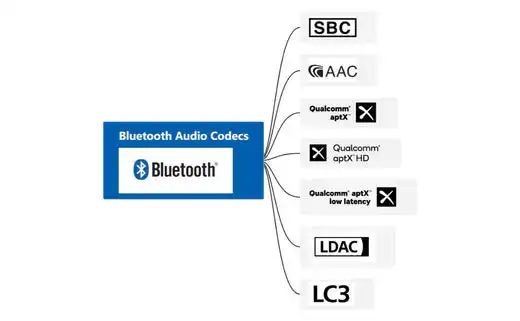
It reconstructs your original audio in real time on the other side after cutting it down to fit through a small wireless path. The objective is straightforward. Make the file small enough to move smoothly while retaining as much of the original magic as feasible.
But not all codecs speak this language the same way. The quality of this process also depends on your device, and understanding different Bluetooth versions can help you see why newer phones often deliver better, more stable audio.
Some preserve detail beautifully. Others cut corners to stay fast and stable. And that difference is exactly why your expensive headphones can sometimes sound less impressive than they should.
Best Bluetooth Codecs Ranked
If your headphones have ever sounded better on one device and worse on another, this is why. The codec quietly decides how much of your music you actually get to hear.
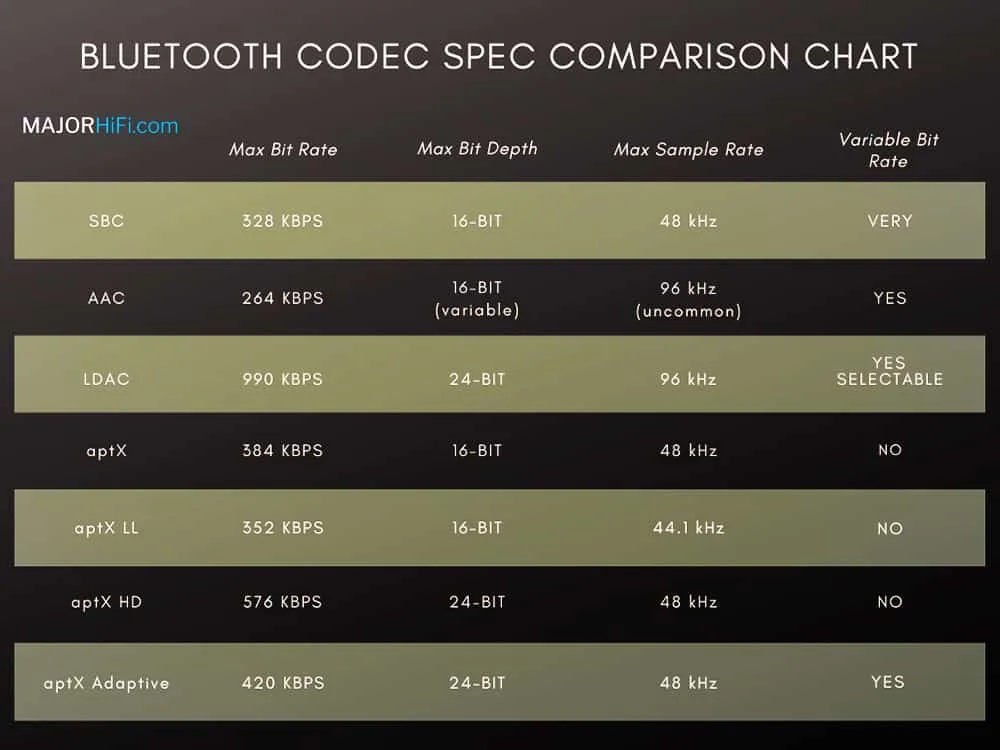
Here is how the most popular Bluetooth codecs stack up when it comes to sound quality, performance, and overall listening experience:
- aptX Lossless: This is the current pinnacle of wireless audio, delivering bit-perfect CD-quality sound at bitrates reaching 1.1-1.2 Mbps.
- LDAC: The near-lossless champion for Android users, supporting bitrates up to 990 kbps for high-resolution 24-bit/96 kHz audio.
- aptX HD: A gold standard for high-definition sound that offers a constant, stable bitrate of 576 kbps.
- aptX Adaptive: A modern, smart solution that dynamically scales its bitrate to balance stability with low-latency performance.
- AAC: Apple’s hardware-optimized standard that provides excellent quality on iPhones through efficient psychoacoustic modeling.
- SBC: The universal fallback that works on every device but offers the most basic, compressed sound quality.
The Ultimate Codec Comparison Table
This is when things become clear if it’s still unclear. You can view the differences between each codec side by side and comprehend why your music sounds the way it does. Selecting the best one is a lot simpler once you understand the trade-offs between speed, stability, and quality.
| Codec | Audio Quality | Latency | Best Use Case |
| SBC | Basic | High (200ms+) | Universal compatibility and calls |
| AAC | Near-CD | Medium | iPhones and Apple ecosystem users |
| aptX | Near-CD | Medium | General listening on older Android gear |
| aptX HD | High-Res | Medium | Critical music listening on Android |
| aptX Adaptive | High-Res | Low (80ms) | Gaming, movies, and busy environments |
| aptX Low Latency | Near-CD | Ultra-Low (~40ms) | Competitive gaming and sync-heavy video |
| aptX Lossless | Bit-Perfect | Low | The absolute highest fidelity available |
| LDAC | Near-Lossless | Medium/High | High-res streaming (24-bit/96 kHz) |
Deep Dive: Understanding The Key Players
It’s time to get to know the people who subtly influence your sound on a daily basis now that you realize codecs have the power to make or ruin your listening experience. These are more than simply technical terms. Each one affects the quality of your music, the stability of your connection, and the amount of detail that really reaches your ears.
You can stop speculating and start hearing the differences once you know what each codec prioritizes.
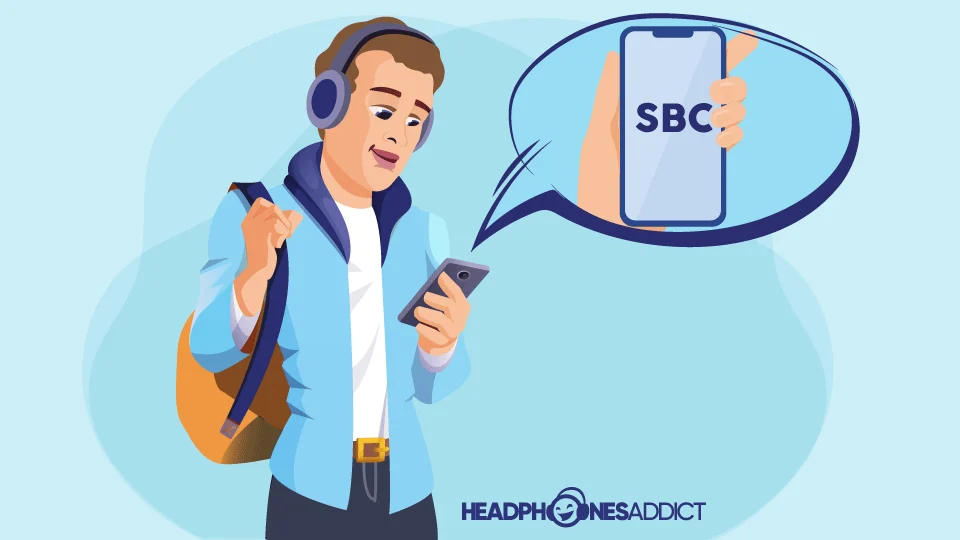
1. SBC
The default that never says no, but rarely says wow
- Standard codec on all Bluetooth devices
- Up to 328 kbps maximum bitrate with 16-bit audio
- Focuses on stability over sound quality
- Can sound flat or muddy in complex tracks
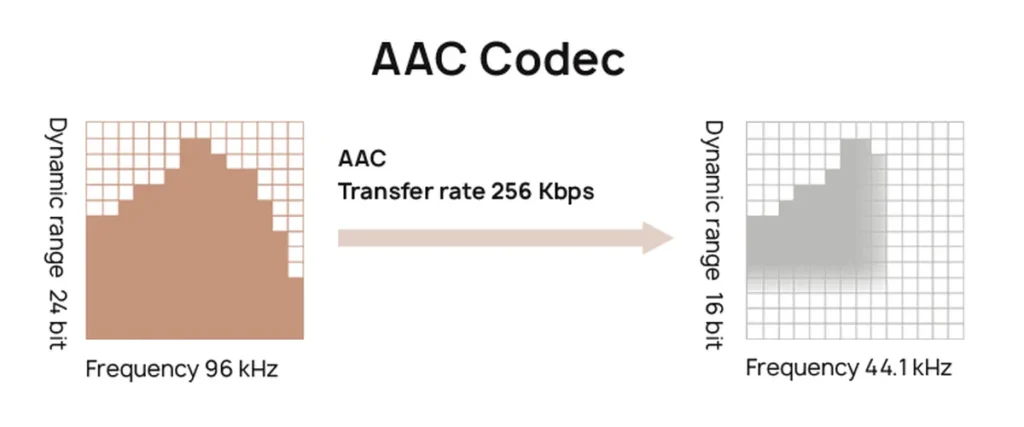
2. AAC
Optimized for Apple, surprisingly powerful when it works right
- Default codec for iPhones and Apple devices
- Up to 320 kbps bitrate with efficient compression
- Uses smart processing to preserve detail
- Best performance on iOS, inconsistent on Android
On Apple devices, this results in objectively excellent sound quality thanks to hardware-level optimization.
3. aptX Family
Built for balance, evolving with every generation
- Standard aptX improves over SBC → Standard aptX runs at 352 kbps bitrate for better clarity than SBC
- aptX HD bullet → aptX HD offers 576 kbps with 24-bit depth for richer sound
aptX Adaptive bullet → aptX Adaptive adjusts between 279-420 kbps depending on the connection
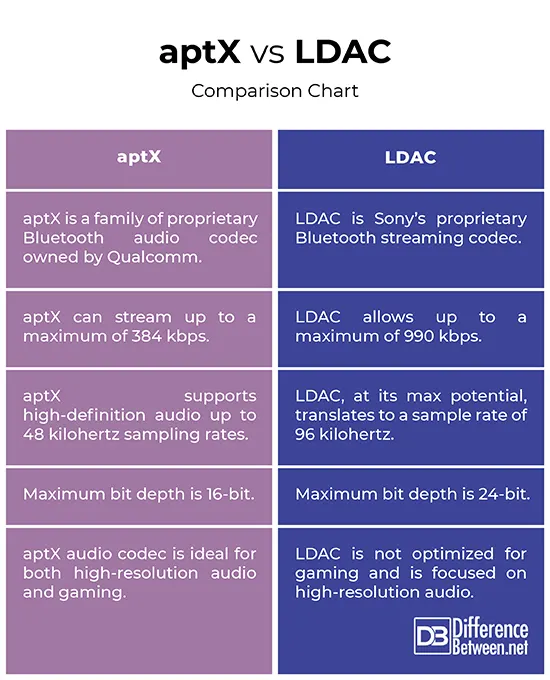
4. LDAC
High-resolution audio that pushes Bluetooth to its limits
- Developed by Sony for premium wireless sound
- Up to 990 kbps maximum bitrate for near-lossless quality
- Needs a strong connection for best performance
- Often drops to lower quality if the signal weakens
In real-world usage, SoundGuys testing shows that this high bitrate can closely match high-resolution audio when conditions are ideal.
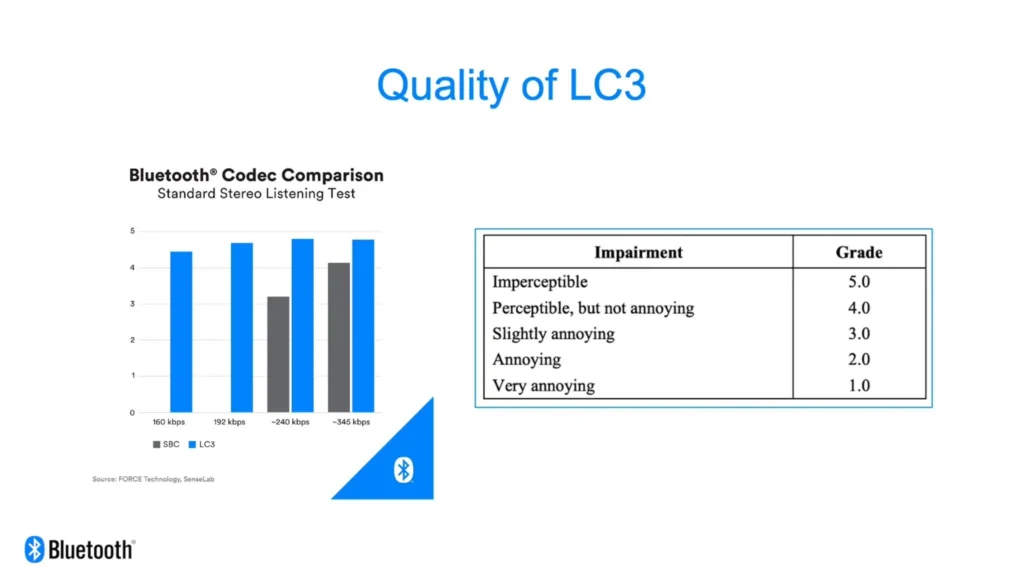
5. LC3
The future of Bluetooth audio, built for efficiency and consistency
- Part of the new Bluetooth LE Audio standard
- Delivers better sound at lower bitrates
- Improves battery life for wireless devices
- Handles signal drops smoothly without harsh interruptions
How Bluetooth Codecs Work: The “Truck And Package” Analogy
Imagine your music is a package that needs to reach your headphones.
The Bluetooth version on your device is the road it travels on. A newer version means a smoother, more reliable journey. The A2DP profile is the delivery truck carrying your music from your phone to your headphones.
Your original music file is often too large to fit as it is. So before the journey begins, something has to shrink it down without completely losing what makes it special. That is where the codec comes in.
The codec acts like a smart packing machine. It compresses your music so it fits inside the truck, sends it across, and then unpacks it on the other side so you can hear it.
For this to work seamlessly, both your phone and your headphones need to understand the same packing method. This happens during a quick connection handshake, deciding how your music will travel every single time you press play.
The Platform Divide: iPhone vs. Android
The codec experience is radically different depending on your smartphone ecosystem.
iPhone Support: Apple devices are strictly limited. iPhones only support SBC and AAC. They do not support any aptX variants or LDAC. If you buy premium LDAC-compatible headphones for an iPhone, they will default to AAC (which is still optimized and high-quality, but not high-resolution).
Android Support: Android devices offer much more flexibility. Most modern Android phones support LDAC and various aptX flavors natively. Android users also have the unique ability to go into “Developer Settings” to manually select a specific codec or force a higher bitrate for better sound.
The Right Choice: Best Codec Based On Use
- Best for Music Enthusiasts: Use LDAC or aptX Lossless to get the most detail out of high-resolution music streaming like Tidal or Apple Music.
- Best for iPhone Users: Stick with AAC, as it is perfectly optimized for the Apple hardware ecosystem. This also plays a role when comparing wired vs wireless headphones, especially in the Apple ecosystem.
- Best for Competitive Gaming: Choose aptX Low Latency or aptX Adaptive to keep lag near 40ms total system latency for proper sync.
Best for Battery Life: Default to SBC or standard AAC, as these require less processing power for encoding and decoding.
If you are selecting headphones for gaming, always check codec latency support. When choosing headphone specifications, always confirm codec compatibility with your device.
Why Your Expensive Headphones Still Sound Bad
If your gear still underperforms, it is likely due to one of these three common issues:
- The Codec Mismatch: You might have premium LDAC headphones, but if you are using them with an iPhone, they are stuck using AAC. Performance is determined by the highest quality codec both devices share (the common denominator).
- Connection Strength: High-bitrate modes like LDAC 990 kbps are very demanding. If you are far from your phone or there are walls in the way, the system may automatically drop your quality to prevent the music from cutting out entirely.
- Hidden Defaults: Many Android phones support LDAC but default to a 330 kbps fallback to ensure connection stability. You may need to manually override this in “Developer Options” to unlock the full 990 kbps potential.
Conclusion
You did not spend on great headphones just to hear average sound.
The truth is simple. Your listening experience is only as strong as the connection between your devices. When your phone and headphones settle for a basic codec, a part of your music never makes it through. The detail fades. The depth disappears. And what you hear is only a fraction of what you paid for.
But the good part is that this is fixable.
Sometimes, it is not about upgrading your gear. It is about unlocking what you already have. A better codec can instantly bring back the richness, clarity, and impact you expected from the start.
So take a minute. Check your settings. See what your devices are really using. Because the difference between flat and unforgettable sound might just be one small switch away.
FAQs
1) What are Bluetooth codecs?
Bluetooth codecs are digital algorithms that compress audio for wireless transmission. They determine the balance between sound quality, connection stability, and battery life between your source device and headphones.
2) What Bluetooth codecs does iPhone support?
iPhones exclusively support the SBC and AAC codecs. They do not support high-resolution or low-latency codecs like aptX, aptX HD, or LDAC.
3) Is LDAC better than aptX?
LDAC offers a higher maximum ceiling (990 kbps) for high-resolution 24-bit/96 kHz audio. However, aptX HD provides a constant, stable bitrate of 576 kbps that can be more reliable in environments with heavy wireless interference.